Free template

Free Construction Timesheet Template for Small Crews

This is the weekly crew time card we'd hand a foreman: one sheet per crew per week, one row per guy, sized to ride on a clipboard in the truck. It covers the job, start and end times, unpaid breaks (on the paper form), daily and weekly hours, and a foreman sign-off. It tracks hours, not pay. Download it as a printable PDF or an Excel file with weekly totals set up.
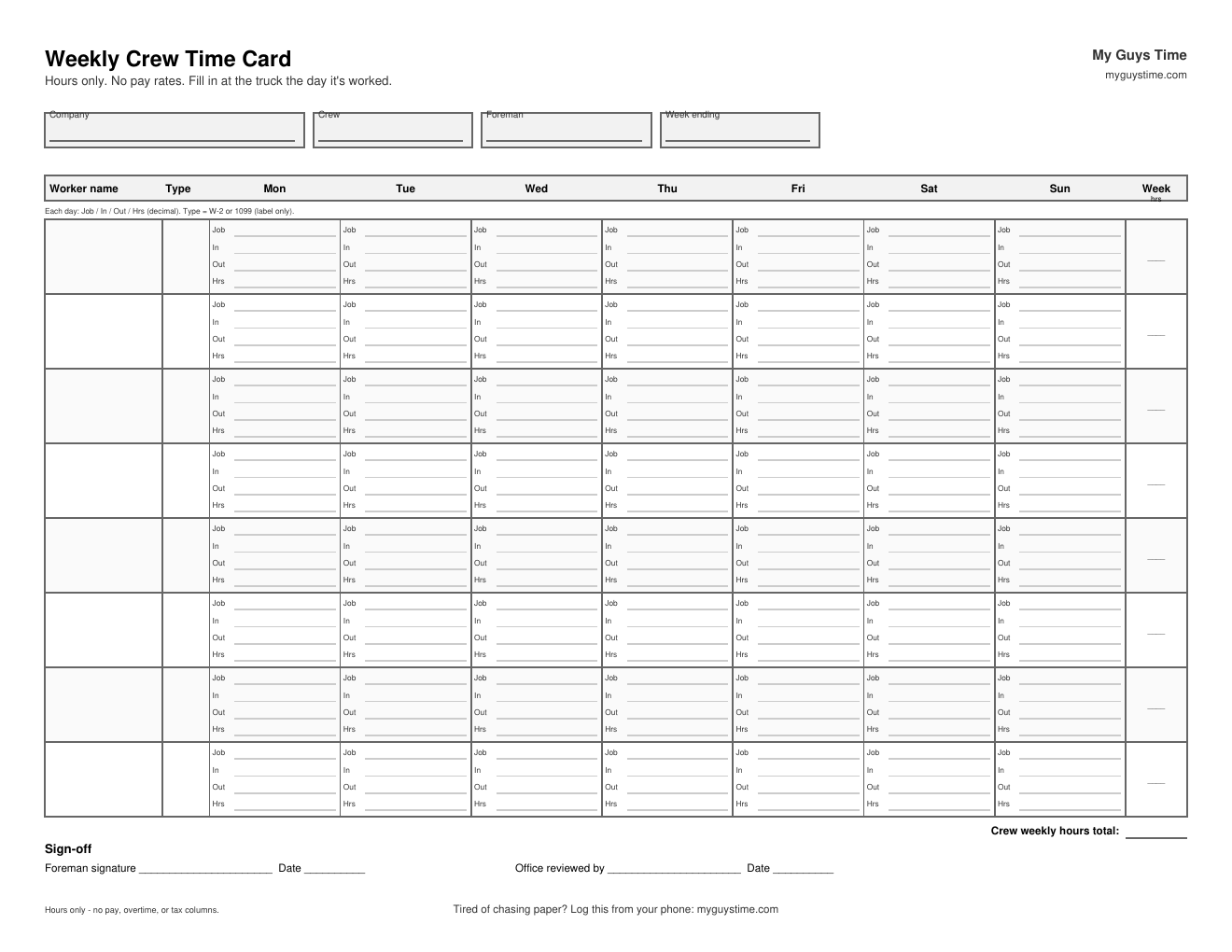
construction timesheet template – weekly crew time card

A construction timesheet should record, for each worker and day, the job or site, start and end times, unpaid breaks, total hours, and notes, with a foreman sign-off at the end of the week. Download the free weekly crew template below (PDF or Excel), or log crew hours from your phone with My Guys Time.

What's in this construction timesheet template

Every field is on the sheet for a reason. Here's what each one does.

  • Company, crew and foreman. So the sheet ends up in the right pile on Friday.
  • Week ending date. One date at the top, so nobody argues about which week it was.
  • Job or site, for each day. Hours tied to a job tell you where the week actually went.
  • Worker name and type (W-2 or 1099). The type column is a label so the office can separate hours by worker type. That's all it does.
  • Start, end and unpaid break, for each day (paper form). Write the times and do the math after. Breaks are where totals drift on paper.
  • Daily hours and weekly total. In decimal hours (7.5, not 7:30), which is what the office works with.
  • Sign-off. Foreman signature and date, then office reviewed and date. A signed card on Friday settles the week before anybody has to argue about it.

What's not on it: pay rates or pay totals. It's an hours sheet. Whoever runs your payroll takes it from there.

Daily and weekly totals on the sheet are decimal hours. Use the chart to convert minutes to decimal hours.

Cards printed in 24-hour time? Use the military time chart.

For the job's day, weather, work done, and delays, use the construction daily report template.

How to fill out a construction time card (daily, not Friday)

  1. Fill it in at the truck, the day it's worked. Not Friday. Friday memory rounds up, rounds down and forgets the half day.
  2. One row per guy. Mark each one W-2 or 1099.
  3. Write the job, start time, end time and unpaid break for each day.
  4. Total the day in decimal hours. 7:00 to 3:30 with a 30-minute unpaid lunch is 8.0 hours.
  5. Foreman checks the week and signs it Friday.
  6. Office reviews, signs and keeps a copy. A phone photo of the signed sheet counts.

Daily vs weekly timesheets

A daily sheet makes sense for short jobs, bigger crews, or a site where the GC wants one sheet per day. For most small crews, the weekly crew card is easier: one sheet, one signature, one handoff. If you do use daily sheets, staple them behind the weekly card so the totals live in one place.

Printable PDF or Excel: which to use

FormatBest forHow it works
Printable PDFA clipboard in the truck, zero techPrint on US Letter, landscape. Fill it in with a pen.
Excel (.xlsx)Office totalsEnter In/Out as times; daily hours and weekly totals add up. Or type hours directly.

Common timesheet mistakes on job sites

  • Rebuilding the week from memory. By Thursday, Monday is a guess.
  • Skipping the break. Or writing it some days and not others.
  • Handwriting nobody can read. Is that a 1 or a 7?
  • Lost cards. Glove box, back pocket, a tailgate in the rain.
  • No sign-off. Then every question about the week is your word against his.

If these sound familiar, read why paper time cards leak hours and the Thursday spreadsheet problem.

When to move from paper to an app

This sheet works if somebody fills it in every day. If that's the part that keeps slipping, an app does the same job with less chasing.

In My Guys Time, the foreman enters the crew's hours from his phone the day they're worked. He approves the week on the weekly crew board (one-person crews auto-approve). W-2 and 1099 workers sit on one board. It's $12/month flat for the whole company, with a 7-day trial.

The app started the same way this sheet did. The mason who built it kept his crew's hours penciled on a length of 2x6 stashed in the cab, until a second crew made that impossible.

Skip the paper: construction time tracking for $12/month · Try the crew view · See the 4-step weekly workflow

Construction timesheet FAQ

Is there a free timesheet template?+

Yes, this one. Download the weekly crew time card free as a PDF or an Excel file. No signup needed.

How do I make my own timesheet?+

Start with the basics: worker name, date, job, start time, end time, unpaid break and total hours, plus a spot for the foreman to sign. Or skip the setup and start from ours, then change the columns to fit your crew.

Is there a construction timesheet template in Excel?+

Yes. The Excel version adds up daily hours and the week for every worker. Totals come out in decimal hours, the way the office needs them.

Should construction timesheets be daily or weekly?+

Fill them in daily, sign them weekly. Most small crews do best with one weekly crew card that gets filled in at the truck every day and signed on Friday. Daily sheets make sense for short jobs, big crews or sites that ask for one. See daily vs weekly timesheets above.

Can I track 1099 subs on the same timesheet?+

Yes. List W-2 employees and 1099 subs on the same sheet and mark each one in the worker type column. How you pay and report each worker is a question for your accountant. The sheet just keeps the hours straight.